Showing posts with label middle school. Show all posts

Saturday, July 8, 2017

Litterarti App for Green Initiatives (plus a padlet hack for younger students)

The idea behind Litterarti is simple: see litter? Take an artistic picture of it, share, and then throw the piece of litter in the recycle bin or trash bin depending on what it is.

This is an awesome app to promote during April, on Earth Day, or by the school's green club.

I was so excited when I heard about this from Katy Noelle Scott at ISTE 2017. I quickly looked at the user agreement and saw it was for 13+, which means I can't use it at my middle school. So I came up with a Padlet hack that not only works across all devices without an app to install, but also can let me moderate the images.

To make the Padlet, I created on in my account. You can even use the shelf feature if you want grades to compete against one another or just to organize the data.

In settings, I made sure the most recent was first.

Under the Share feature, I toggled on moderation. This would prevent pranksters from posting anything scandalous. (See image below)

Directions were included at the top. You can easily put a link on the school website, as a QR code, and/or customize a Tiny URL to make it easy for students to post. Create a quick video of how to use it for the morning announcements and add some incentives, including sharing some of the best from that week on the announcements.


Tuesday, July 4, 2017

Students Writing for an Authentic Audience: Their Future Selves

When I was in 8th grade, I wrote a letter to be opened when I became a senior. After reading the letter
senior year, I wish I had written myself every year!

I always wanted to have students write to themselves and then get it over the summer when they were getting ready to enter high school but knew it would be too much for me to keep up with. However,  technology makes it easy for students and teachers to write their future selves.

Students can compose letters to themselves...
...at the beginning of the year of their goals to be delivered mid-year so they can evaluate how well they have moved toward accomplishing the goals.
...to be delivered a year from then as a writing sample so they can then see how much they have matured as people and grown as writers
...for the far future 6th to 8th grade or 9th to 12th as time capsule


Office:

Delay the delivery of a message
  1. In the message, click Options.
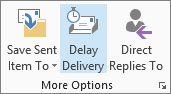
  2. In the More Options group, click Delay Delivery.
    Delay Delivery command on the ribbon
  3. Under Delivery options, select the Do not deliver before check box, and then click the delivery date and time that you want.
After you click Send, the message remains in the Outbox folder until the delivery time.

Gmail:

You'll have to use an add-in like http://www.boomeranggmail.com/

Other:

If you would rather use a Web 2.0 tool, I've listed several below. However, do your due diligence, check terms of service and make sure students are not posting any sensitive information. Teach students how to use initials instead of names and not include identifiers like age, location, or anything that is personal or private. This is a great opportunity to reinforce digital citizenship and cyber safety.


www.futureme.org
411: 13+, specific day option, option to make letters public, some public letters can be inappropriate.

http://lettertomyfutureself.net
411: No terms of service disclosed. letter delivery options have preset increments of time


Sunday, February 5, 2017

Inforgraphics Made Easy

Easel.ly not only provides students with easy to create inforgraphics perfect for the classroom, it also provides teachers a very handy e-book guide. The guide shows teachers how to set up groups for students to login without providing an email address. All you have to do is create a login and they send you a link.

Additional tips and ideas:

  • Have students start with a template if they have not had infographic-making experience
  • There is already a place to insert a list of resources. My favorite resource for students to create MLA format is Purdue's OWL Lab.*
  • Encourage students to link images and information back to their source material 
  • Because students can get bogged down altering the aesthetics, create a classroom procedure of needing teacher approval before playing with color schemes and extras
  • Because some tech- and content-savvy students finish early, I like to offer lesson add-ons for students. These are challenges for students to take and incorporate into their projects. It gives students another skill, keeps them engaged, and won't result in kids trying to rush through their work to get the opportunity to play a computer game. These are sort of like those 5 minute filler lessons that we teachers have when a class finishes a lesson early, but individualized. A great add-on for Easel.ly is asking students to Blabberize on of their images. They create the Blabberize and then hyperlink the image on the Easel.ly to the Blabberize. Students could also create a Vocaroo to hyperlink. 

*I know that many people like Easy Bib or Citation Machine, but I find that students tend to still have errors in their bibliographies AND no understanding of how to read the information in the bibliography. If I want my students to be able to use bibliographies as readers, I have to teach them how to write them. I would personally rather a student make an error in a bibliography entry they wrote than an error is one from Easy Bib. Just my two cents for my middle school ELA classroom.


Monday, January 2, 2017

Open-Ended Responses for Plickers


One of the biggest drawbacks of student response systems is that often in ELA I want my students to do more than just answer multiple choice. How to get students to write answers while still taking advantage of the data these response systems have to offer? Simple: don't put answer options down!

I create the questions like above where A is a, B is b, C is c, and D is d. In groups, have students answer the question (or in the case of the above, finish the sentence) on a sentence strip. While the view is NOT on bar graph, have students put their sentence strip next to a letter. Students can then vote on the best answer. When done, flip it over to the bar graph view. Have students talk in groups about the results and then share out.

Saturday, November 5, 2016

Using Plickers for Status of the Class

Nancie Atwell's status of the class for determining which children are in which stages of the writing process can be applied to any class in which there is a multi-day and multi-step assignment.

You can create a Plicker question to represent the status options or create a blank Plicker question and ask it
on the fly. Use in art class, for PBL, writing workshop, etc.

It lets you instantly prioritize checking in/conferences, see if there are larger issues, and proactively take care of concerns before things spiral out of control. Additionally, if students need to peer conference, you have in your hand which students are looking for that and can pair them up easily.

Monday, June 27, 2016

BreakoutEDU 411

What is BreakoutEDU? 

Simply put, participants solve a series of problems in order to unlock the main Breakout box. Clues are content related and typically involve a mixture of physical and digital tasks. Breakout can be content specific, team building, or even professional development.

What do I need?

Breakout instructions - many made by classroom educators - will take no more than what is in the breakout kit (minus some office supplies). I was able to put together  my own for $60 (which involved me getting 3 extra locks because I did locks that came as pairs. That way it was less per lock and I could add in more puzzles if I wanted) using Walmart roll-back plastic toolboxes and locks and finished up the kit with locks from Amazon. Or you can order a kit from www.breakoutedu.com. Some people are able to get their kits paid for by Donors Choose grants. Just use Amazon and you can get 2-3 kits. Crowd-source it with a team of teachers and there should be enough for the smaller group Breakouts. Kit includes:

  • USB drive
  • 4-digit lock
  • 3-digit lock box (I made mine with a smaller plastic toolbox and a small 3-digit lock)
  • large Breakout box (some games require the little box to be in the big one, so I would 
  • directional lock
  • word lock - 5 letters
  • key lock
  • hasp 
  • invisible ink pen
  • UV flashlight (I bought the pens with the UV light on the cap. Many breakouts involve separating batteries from flashlight. I just take out the bulb and battery combo)
  • some games will ask for little things like paperclips or whatnot, but it shouldn't require additional items that wouldn't be commonly found in a school. In fact, there are a lot of cool ciphers and puzzle ideas on the Facebook group and Pintrest. 

How do I start?

Sign in to breakoutedu.com - MAKE SURE TO CHECK THE PAGE AFTER YOU SUBMIT YOUR INFO! THE PASSWORD IS IN THE INSTRUCTIONS! 

Get a sense of how a breakout works by trying it out with loved ones. I knew I wanted to create a dystopia Breakout so I picked Dr. Johnson's breakout as a trial run. I hid the zombie virus anecdote in my large breakout box - it was for my hubby so I made sure it was a proper payment for giving up his time to do this  ;) - set up the game in the playroom, and watched him go to work. He had to do all the steps to get into the large box while also avoiding the red herrings out into the game (and a sneaky wife who hid things under the blinds). 

Make sure you sign up to the Facebook group! People will show off neat ideas and share tips.

Can I make my own?

That's what I did! I started with what I wanted my students to cover content-wise and then I looked for opportunities for the texts/visuals/concepts to fit one of the types of keys. From there, I created clues. For example, I knew I wanted the students to look at the etymology of utopia and dystopia. When I was on etymonline.com, I noticed it mentions who coined the terms. I decided to play on the homonym of "coin" and created a coin to put in the box that would lead participants to a letter lock clue. 

If making your own sounds daunting - I saved time by adapting parts of a webquest I've used in the past - you can instead add to an existing BreakoutEDU. Add in a couple more puzzles to get to existing clues or add more puzzles with new locks. 

Breakout in lower elementary:

Breakout in upper elementary: 

Breakout in middle school (this is created by 7th graders for 8th graders!):

Breakout in high school:

Tuesday, June 14, 2016

Creating Templates for Padlet

Padlet is one of my "go to" applications for beginning or end of class activities. Since it is device agnostic, it is perfect for a BYOD classroom. In situations where tech is not 1:1, which is my usual day, I have students use the BYOD as small groups.

To make things easier to incorporate Padlet, I've created templates for Padlets. Now when I want students to work on a KWL, Venn Diagram, or similar graphic organizer I have them already set up and ready to go. I just make a copy of the original for my class and share out with QR code or shortened URL (I prefer Bit.ly solely because I love having a puffer fish up on my task bar!) 

How to create Padlet Templates to Facilitate Do Now. Closure Activities:
Step 1: Create Template
I use PowerPoint because I like the SmartArt Feature, but you can use anything that will save as a JPEG.

Step 2: Save as a JPEG

Step 3: Create a Padlet. Click on the clog in the upper right hand corner to modify. Scroll down to Wallpaper and select "MORE"

Step 4: Select your JPEG by clicking on "ADD YOUR OWN", "UPLOAD", and then either drop your image in or "CHOOSE FILE" and confirm.

Step 5:  After saving changes you should be able to see if you need to adjust your original image to fit the screen how you want. Repeat steps 1-4 until you have the desired look.


Then each time you want to use the chart, Venn Diagram, or similar template, just make a copy and rename with the specifics of the lesson. For example, KWL's copy becomes "KWL - Holocaust".

Saturday, June 11, 2016

Clickbait for the Classroom: Using the Tricks Websites Use to Engage Students

This week I presented at Fort Bend ISD's Digital Learning Conference. In an effort to complete with some very interesting sessions (people got to program robots build with Legos, learn about the new Microsoft Office our district just rolled out to the teachers and are about to roll out to students next year, etc.) I decided to send out this tweet:

We ended up having to turn people away! So it got me thinking, could I use the same tactics for my blog - with accompaning Pintrest and Twitter feed - in my classroom. After all, there is a reason why people use these tactics. 

Before blogging, it would not have occurred to me to have made clickbait, but since I can see which posts get me hits on my blog posts, I've become increasingly savvy on how to get hits:
- pleasing visuals (canva.com is my new love for images I'm posting to twitter) 
- titles (clickbait titles as well as listicles) 
- organization of info (lists, infographics, or any other visual that helps people easily get info)

So why not approach how we give assignments in the same way? What if on the board instead of the homework being 

"Read article 'Bridges Made of Spider Silk? You Can Thank the Goats for That' and write response entry." 

VS: 

By tapping into our students' brains and how they are already primed for visuals as well as the reason why clickbait is so effective - a person's curiosity is piqued - students may be more likely to do the work and approach as less of an arduous task and more as a point of inquiry. 

3D Gallery

Easy to use and apply this 3D Art Gallery by Classtools.net!


Art: create a digital portfolio of student work and student can include artist statements
Art: Artist study. Students can put work in chronological order.
History: To review an era, students can take well known works from that era and apply them. Students could also create questions for students to answer.
Science: Potential research project for the evolution of scientific discovery.
Science: diagrams for review with questions.
Science: research project about a particular scientist.
ELA: Visuals to connect for a novel study with text evidence and reasoning.
ELA: For texts in which history plays a large part (either historical fiction or works in which the time period of the author is highly influential), students conduct pre-reading or post-reading activities highlighting primary source visuals of events, people, and places and writing the significance to the text.

Saturday, June 4, 2016

5 Skill-Building Time Fillers for Computer

When you are in the computer lab as much as I am, telling students who are done with the assignment to go play an educational game becomes problematic. Students may rush to finish the assignment and not do their best. Students who work slower never get to play the game. Once you open up the computer to Cool Math Games "but only play the ones where you actually practice math! And no games that look like shooting!" as the teacher, you are now trying to monitor game selection, distracting you from helping students with the assignment. I find that classroom management issues can often be mitigated with sound lesson planning, and the filler minutes are no exception.

When looking at students creating a digital work, I think of add-ons: extra things students can do that will enhance their product, develop additional skills, and keep students engaged and on task even when "done." Here are some of my favs:

Blabberize -
What it does: gives an image a mouth that you can then make "talk"
What it is good for: any product. Students can download the video for multimedia products or can do the hyperlink option for interactive products where video where hyperlinking would be a better option such as word processors, Thinglink, or easel.ly. Print products would need a QR code added.

Voki 
What it does: similar to Blabberize, Voki provides avatars instead.
What it is good for: Because it can't be downloaded, Voki is better for an interactive product where the viewer can click on a  hyperlink  (example in my hyperlink!) Print products could us a QR code to connect

QR Stuff:
What it does: creates QR codes to link to text, webpages, etc.
What it is good for: if the finished product will be printed - posters, brochures, images - students can add a QR code that links to all sort of things: as text they could write and artist statement, create link to a webpage that includes more information. If the product can be posted to web, students can spend 5 minutes creating a flyer in a word processor with a QR code for their work and then print out the flyer and attach to their locker or give to their parents.

Thinglink:
What it does: makes images interactive with buttons that can lead to text, webpages, images, etc.
What it is good for: for products that are images - anything that can be saved as a jpeg - like collages, students can import into a Thinglink (there is a way to create a dummy student account. I would suggest creating one that can be used by all students instead of each student) and add links to sources or additional annotations.

Vocaroo:
What it does: records audio on the internet and provides link to the audio (audio is private and can only be accessed by a link)
What it is good for: interactive products or print. Student can embed, link, or hyperlink. If doing a print product, use QR Stuff to add in link.


Saturday, May 7, 2016

Analyze Decisions in Drama


Reading narratives lets you analyze decisions of characters and authors, but when that narrative is a piece a drama there is an entire world of decisions waiting to be analyzed. Directors, actors, costume designers, and lighting directors make a multitude of decisions as they work with the texts. To me, what a waste of Shakespeare if we don't have students take this opportunity to look at interpretations of his work! 

In A Midsummer Night's Dream, I love to have students look at Act 3, scene 2, where Hermia and Helena are fighting and Lysander and Demetrius are torn between wanting to protect Helena and wanting to fight. The scene has so much action, and comedy, and conflict that watching it three times in three ways doesn't feel arduous. I prefer to use stage productions, where possible, although the benefit of a movie version thrown in does them lead to some interesting questions: What are they able to do in movies that can't be done on stage? How is the movie of an audience different than that of a theater?

I like to match a traditional clip (you can actually find clips from The Globe on YouTube!), a clip set in a past time period (there is a great one set in the 1960s by the University of California), and a very modern clip, which is actually part of our Wordplay Shakespeare.

The most important reason I think students should experience analyzing different versions of the same scene is that if they only see one version they think that is the way to do it.

Tuesday, May 3, 2016

Analyze Character with Costume Design

Switch up the mundane "character trait, textual evidence, explanation" by asking your students to adapt to book into a movie set on their campus. Students act as costume designer and have to use character traits and symbolism to hit on keep traits, motivations, relationships, and themes.

Students responded very positively to this assignment. I had a lot of kids telling me both in person and via the Edmodo login that it was fun.


Sample from a student's analysis of A Midsummer Night's Dream:

One way I would modify it in the future is request student use at least one piece of textual evidence per slide.


Friday, April 29, 2016

Thinglink to Annotate Tableaus

Inspired by the Royal Shakespeare Company's use of student created tableau to foster close reading, I knew it would be a perfect pairing with Thinglink.
Analyzes movement to connect to motivation

Students select a moment in time to create a freeze frame, snap a picture to create a moment in time from the text, and then annotate the decisions they made in body, facial expression, proximity, and movement. The app is stripped down compared to the website, but it is easy to use with a picture students take of themselves if it is all on one device.
Analyzes proximity to reveal conflict.

The trickiest part is actually on the teacher end. Thinglink limits the amount of groups - 3 - and students - 105. So if you have class sizes like mine and 6 classes, you can't make a group for each class or give every kid a login. I decided to have one student per group request I register. Because the registration produces a dummy e-mail, complex password, and then I have to have students insert the class invite code, there are some steps that the students must take logging in that would not be friendly for younger students, but once they were in and students got into the app, I had very few questions and students were able to work through it fairly quickly.
Citation of lines that show the moment in time.


I also like that this is a shorter assignment. Students did their first one about half a period. I think if we did a second one, we could probably get the kids down to 15 minutes now that they understand how to login and use the app.


Monday, April 4, 2016

Instant Poetry 2: Beautiful Poetry App

Instant Poetry 2 is a great app for teachers - students can make a poem quickly and it is a very non-threatening app. Teachers not used to iPads will quickly get their students making poetry in thirty minutes or less. The finished products are lovely and the free "stripped down" version does not feel stripped down at all.


Saturday, March 12, 2016

Poetry to Rock Your Socks: Combining World Poetry Day and World Down Syndrome Day

Our counselor in charge of No Place for Hate came to the ELA department to ask us to do a poetry assignments that celebrates out heritage, culture, religion, etc. for March 21st. We decided to do a modified I Am poem that includes info about such things.

Then yesterday, we get an e-mail about World Down Syndrome Day and the viral campaign #lotsofsocks to raise awareness on ... March 21st! So with a quick modification to the task, students are going to be exposed to both concepts with the overarching idea of celebrating a world of diversity regardless of race, religion, or how many copies of the 21st chromosome one has, write the I Am poem, and place it on a handout that looks like a sock.

Students then color the socks to reflect identity. Hang them up on a  clothesline, and you have a wonderful celebration of diversity!

Finished Products:

Thursday, March 10, 2016

Paper: the free app you never knew you absolutely needed

Paper touts itself as a note taking device - and what snazzy one! - and makes up for the weaknesses of some of the other note taking devices by seamlessly integrating pictures, annotations, and texts with an ease that required almost no time to acclimate to the user interface.

I love to take pictures at conferences, but with some of the other note-taking apps, taking a pic of the PowerPoint Slide and then annotating can be more of a hassle, making me lose valuable information. When using Paper, I can immediately begin writing on the picture, add text to the bottom, and be on my way.

It doesn't just stop at notes - which is what makes it so priceless! Lists and drawing diagrams. This makes it perfect for going upward into the higher level of Blooms by doing assignments like creating a charticle or diagram.

If Evernote and Doodle Splash had a baby that an elementary student could use, you'd have Paper. Just as versatile as its namesake, it is a must have for teachers and students. It goes right to the top of the list for students, who research shows are way more prone to taking a picture than typing something in an electronic planner, to be able to take a picture of the homework assignment on the board and quickly add whatever notes they need as well as interact with diagrams and other visuals they need throughout the day.

Saturday, February 20, 2016

Feature Writing as Summary

There are a hundred ways I could use the newspaper feature on www.fodey.com, but one of my favorites is the idea to have students respond to a chapter by writing a news article over it. I think it is great because it adds a creative aspect to retelling events. For my 8th graders, I would require that the headline needs to hint at a thematic issue or message.

I love how the website (1) lengthens the page so the end product can be short or long, (2) creates a downloadable image file that can be easily uploaded to Edmodo, Padlet, or incorporated into an appsmash, and (3) super authentic! It looks like the ink print from other newspapers has been left on it. This could create some really cool "historical" documents. I used to do a research project where students wrote diary entries from fictional or real characters in WWII. Wouldn't it be neat to have the end product of a research project like that be a fictional online archive?

For my example, I used The Outsiders. I had to research where the country may have been that the boys ran off to and what a viable date would be for the book, including the day of the week for that date. I had to imagine quotations from characters that seemed authentic to what we know about those characters.

Directions:
1. Think of what event happened in the book/chapter/story that would be front page worthy
2. Use the newspaper function on www.fodey.com (make sure to pause add blocker if you have that on your computer) to write a newspaper article that reveals the events
3. Use a maps website to come up with an accurate name for the newspaper and locations
4. Research the day of the week for an accurate date
5. Make sure your headline acknowledges a thematic component
6. In your summary, include a quotation from a character. This quotation should not be dialogue lifted from the text, but rather dialogue you create based on what you know about the characters and who a reporter would interview about this event


Saturday, February 13, 2016

Lit Analysis Gamifiction with Make Dice Lite

What is Make Dice Lite?

Make Dice Lite in an iPad that allows the user to customize dice and use up to 6 at a time. To roll the dice, students can tap the screen or shake the iPad.

Lit Analysis Set Up

In groups of three to 4, students use 1 iPad to create two dice. The first die is whatever literary elements you want your students to analyze. I use character, conflict, symbol, theme, connect two topics, setting.
The second die is one about thematic topics. Examples from The Outsiders: violence, family, loyalty, redemption, social pressure, equality, etc. (Students can choose their own).

Roll the Die

Students roll the dice and create a question with those two things. Provide question stems or example for the different literary elements. EX:
Theme: What is the lesson we are supposed to learn about ______?
Symbol: What object in the text represents _____?
Setting: How does the setting contribute to the lesson we can learn about ______?
Two topics: How are _____ and _____ related?
For character and conflict, it so much depends on the topic I encourage my students to come up with their own way of asking. 

Gamification

Students number off A, B, and C. Students then complete to answer questions. Students take turn answering the question and give text support. For each question, 1 participant answers it and gives support. The other two people then rate the answer with evidence and explanation on a scale of 1-3. The person who answered the question get the combined score. The other group members can each get 1 bonus point for providing approved additional evidence. 
EX: How is setting related equality?
Student A: Tulsa is divided east and west in the novel. The rich Socs are on one side and the poor Greasers on the other, which keeps them separated and continues the idea that by being separated, they aren't able to take down the walls that divide them. If they got to know each other more, the inequality may not create hate. 
Student B: that was really good, I give a 3 out of 3.
Student C: I'm not clear on the theme you think Hinton has about equality so I say 2.
**Student A gets 5 points**
Student B: another thing that supports what you said as an answer is the setting of the dive-in. At the drive in the Socs get to sit in their cars while the greasers have to be out in the elements of the bleachers. 
*** student B gets a point ***
Student C: The school setting also supports that. Remember when Ponyboy talked about how he was in the more advanced classes? He pulled out a knife to dissect a frog and a Soc girl who was his lab partner was horrified. The way there is that divide in the classes at school also makes there be a divide int he social classes. 
*** Student C gets a point. It is now student B's turn to answer a question and try to get the three points ***


Monday, February 1, 2016

Text Smash/App Smash

With commonlit.org, creating a project-based learning experience is easy in that the website is organized by PBL questions! This makes it perfect for across text comparison and an opportunity for students to examine two texts answering the same question.

Thinking of across text comparison got me thinking of App Smashing - combining apps to make a project. So why not a text smash/app smash?

My instructions are specifically for The Outsiders, but check out my lesson flow on graphite to get a generic lesson that can fit no matter what whole class text your students have read.


Monday, January 18, 2016

Building a Better Webquest

Start with the Skills

Prior to a thematic unit or novel study, many teachers prefer webquests to build background over lecture. By providing students with links and questions, students are able to pace themselves and explore resources instead of being passive participants during lecture. However, with the increase of rigor and what feels like not enough hours in the day! Webquests must then serve two functions at the same time: prepare for the coming unit while building skills. 


Evaluate what skills I like to have my skills for the grading period written out. If there is a poetry standard, I know I’ll try to find a poem or song. Vocabulary and dictionary skills also tend to be TEKS for each grading period. I also try to use technology skills. Using the review feature in work for students to annotate the song “Imagine” for my Utopia/Dystopia webquest or using turnitin.com’s discussion board features or the synonyms feature of Word. 


Search for Varied Genres and Sources

When creating a Webquest, I want to take advantage of the media sources on the internet both audio and visual so I like to include things like YouTube/TeacherTube videos, a poem on Poets.org with an audio recording of the poet reading his work, and PBS LearningMedia pictures and videos. I also think that a Webquest opportunity is wasted if students are not participating in an interactive or Web 2.0 activities. To me, if a Webquest could be completed with library books, what is the point? PBS has some great resources like putting students in the shoes of a African-American man trying to vote during Jim Crow, or analyzing how advertising tries to trick the viewer, or learning about Edgar Allen Poe by investigating his death or interacting with his texts or exploring the nature of self-segregation with the Parable of the Polygons (my personal favorite!!!!) . 


Web 2.0!

Taking a couple days in the computer lab just to have students write answers on a Word document is a crying shame of the plethora of easy Web 2.0. Students can use the snipping tool to grab evidence. Some easy Web 2.0 to use: