Showing posts with label ela. Show all posts

Wednesday, May 10, 2017

Sway Summary Synthesis

Blended learning is more that tech integration; it is about tailoring or allowing students some control  to meet needs of diverse learners. Students benefit with explicit instruction about how to find the right Lexile levels for them with Newsela, Readworks, and/or Common Lit.

For the lesson below, ability grouping works well for partners or groups. When working
collaboratively, those discussions about the task model the internal discussions students will need to have in future independent work.

Google classroom? Use Google Slides!

1. Students select an article from a source. You can give specific text sets in Newsela to focus discussion on text that supports current novel being read.
2. Group reads, making notes for a GIST summary of who, what, where, when, why, how and then write a 20 word GIST. Blended learning involves online instruction: create a video modelling GIST summarizing with a common text.
3. Students create a collaborative Sway for the 5W and H and 20 word GIST. Since it is collaborative, they can all work on it at the same time. 
4. Students share in a discussion board in an LMS or a platform like Edmodo.
5. Students critique at least 2 articles. Reading the article, viewing the Sway, and responding with one of the stems:
  • The summary needs more information about...
  • The summary is strong because...
  • I want to learn more about...
  • This reminds me of...
6. Groups go back to revise Sway. 

Use template below if you wish! Have students click on website link and save to their own Office 365 account. 


A huge shout out to JMozi for being the perfect fellow ELA tech educator to collaborate with! Philosophical alignment + different enough brains to build upon each other + a mutual respect = this lesson we co-created!

Friday, April 14, 2017

Replacing Venn Diagrams: a deeper way to compare texts

Problem: Students are filling out a Venn Diagram comparing two texts and surface level, comprehension-based information is quickly filling it. Maybe 1 or 2 students show any depth of thought, and you are worried that not many kids are actually growing in their skills.

Solution: Throw out the Venn Diagram and begin with the depth with abstract concepts.

1, Create a mini-lesson introducing or reviewing abstract ideas vs. concrete details. I prefer a Nearpod "draw it" activity where students are circling. With BYOD, this can be collaborative.

Love the look of Mentimeter!
2, For the each text, create a class brainstorm list of all the possible ideas for each text. You could keep Mentimeter or Answer Garden.
this going in Nearpod collaborate feature or use

3, Now students find abstract concepts that are the same or antithetical - I use the metaphor of a coin: one side is heads and one is tails but it is really the same coin. Same thing with ideas: injustice and justice are just two sides of the same coin. - and put that in the middle column. Then they determine the theme (for narrative) or claim (expository/persuasive) that goes along with that text and write it in a complete sentence under "Text A/B" and then provide textual evidence. I always have students do this in pairs.
This is the graphic organizer I created to get depth in across text comparison. 

Blended Learning station: Use Office Mix or a screen casting for the mini-lesson. For brainstorming, set up a discussion board in Schoology with the setting in such a way where students can not see other responses until they themselves have responded. Use a collaborative Office 365 or Google Document for the application of the strategy for the graphic organizer. Use a resource like Common Lit for student choice in texts!


Monday, March 13, 2017

Blended Learning Vocabulary Practice 4 Ways!

Vocabulary: every content area has it and students need to practice it. What kind of options can you give as a way of showing understanding? Use the below 4 as options in an iPad center, warm-up, or closure activity. 


Option 1: Doodle Buddy (App)/Aww App (Web 2.0)
Create a visual representation of your vocabulary word. Using the text feature label the vocabulary
word and type the definition in your own words

Option 2: Chatterpix (App)/Blabberize (Web 2.0)
Make or take a picture associated with your vocabulary term and make it talk and tell the listener the vocabulary word and the definition in your own words

Option 3: Make Beliefs Comix (app or website)
Create a comic in which one of the character uses the vocabulary word correctly. Make sure the context clues reveal the meaning of the word.

Option 4: RWT Crosswords (App) or Crosswords Puzzle (Wed 2.0)
Create a crossword puzzle for your vocabulary words with synonym or synonym phrases as the clues.


When students are done they can submit to the LMS of your choice. If all words will be done of the course of several days, have students curate their word into a presentation tool like Google Slides, Sway, PowerPoint, or even iMovie.


Share additional ideas below!


Sunday, February 5, 2017

Inforgraphics Made Easy

Easel.ly not only provides students with easy to create inforgraphics perfect for the classroom, it also provides teachers a very handy e-book guide. The guide shows teachers how to set up groups for students to login without providing an email address. All you have to do is create a login and they send you a link.

Additional tips and ideas:

  • Have students start with a template if they have not had infographic-making experience
  • There is already a place to insert a list of resources. My favorite resource for students to create MLA format is Purdue's OWL Lab.*
  • Encourage students to link images and information back to their source material 
  • Because students can get bogged down altering the aesthetics, create a classroom procedure of needing teacher approval before playing with color schemes and extras
  • Because some tech- and content-savvy students finish early, I like to offer lesson add-ons for students. These are challenges for students to take and incorporate into their projects. It gives students another skill, keeps them engaged, and won't result in kids trying to rush through their work to get the opportunity to play a computer game. These are sort of like those 5 minute filler lessons that we teachers have when a class finishes a lesson early, but individualized. A great add-on for Easel.ly is asking students to Blabberize on of their images. They create the Blabberize and then hyperlink the image on the Easel.ly to the Blabberize. Students could also create a Vocaroo to hyperlink. 

*I know that many people like Easy Bib or Citation Machine, but I find that students tend to still have errors in their bibliographies AND no understanding of how to read the information in the bibliography. If I want my students to be able to use bibliographies as readers, I have to teach them how to write them. I would personally rather a student make an error in a bibliography entry they wrote than an error is one from Easy Bib. Just my two cents for my middle school ELA classroom.


Monday, January 2, 2017

Open-Ended Responses for Plickers


One of the biggest drawbacks of student response systems is that often in ELA I want my students to do more than just answer multiple choice. How to get students to write answers while still taking advantage of the data these response systems have to offer? Simple: don't put answer options down!

I create the questions like above where A is a, B is b, C is c, and D is d. In groups, have students answer the question (or in the case of the above, finish the sentence) on a sentence strip. While the view is NOT on bar graph, have students put their sentence strip next to a letter. Students can then vote on the best answer. When done, flip it over to the bar graph view. Have students talk in groups about the results and then share out.

Saturday, November 5, 2016

Using Plickers for Status of the Class

Nancie Atwell's status of the class for determining which children are in which stages of the writing process can be applied to any class in which there is a multi-day and multi-step assignment.

You can create a Plicker question to represent the status options or create a blank Plicker question and ask it
on the fly. Use in art class, for PBL, writing workshop, etc.

It lets you instantly prioritize checking in/conferences, see if there are larger issues, and proactively take care of concerns before things spiral out of control. Additionally, if students need to peer conference, you have in your hand which students are looking for that and can pair them up easily.

Monday, June 27, 2016

BreakoutEDU 411

What is BreakoutEDU? 

Simply put, participants solve a series of problems in order to unlock the main Breakout box. Clues are content related and typically involve a mixture of physical and digital tasks. Breakout can be content specific, team building, or even professional development.

What do I need?

Breakout instructions - many made by classroom educators - will take no more than what is in the breakout kit (minus some office supplies). I was able to put together  my own for $60 (which involved me getting 3 extra locks because I did locks that came as pairs. That way it was less per lock and I could add in more puzzles if I wanted) using Walmart roll-back plastic toolboxes and locks and finished up the kit with locks from Amazon. Or you can order a kit from www.breakoutedu.com. Some people are able to get their kits paid for by Donors Choose grants. Just use Amazon and you can get 2-3 kits. Crowd-source it with a team of teachers and there should be enough for the smaller group Breakouts. Kit includes:

  • USB drive
  • 4-digit lock
  • 3-digit lock box (I made mine with a smaller plastic toolbox and a small 3-digit lock)
  • large Breakout box (some games require the little box to be in the big one, so I would 
  • directional lock
  • word lock - 5 letters
  • key lock
  • hasp 
  • invisible ink pen
  • UV flashlight (I bought the pens with the UV light on the cap. Many breakouts involve separating batteries from flashlight. I just take out the bulb and battery combo)
  • some games will ask for little things like paperclips or whatnot, but it shouldn't require additional items that wouldn't be commonly found in a school. In fact, there are a lot of cool ciphers and puzzle ideas on the Facebook group and Pintrest. 

How do I start?

Sign in to breakoutedu.com - MAKE SURE TO CHECK THE PAGE AFTER YOU SUBMIT YOUR INFO! THE PASSWORD IS IN THE INSTRUCTIONS! 

Get a sense of how a breakout works by trying it out with loved ones. I knew I wanted to create a dystopia Breakout so I picked Dr. Johnson's breakout as a trial run. I hid the zombie virus anecdote in my large breakout box - it was for my hubby so I made sure it was a proper payment for giving up his time to do this  ;) - set up the game in the playroom, and watched him go to work. He had to do all the steps to get into the large box while also avoiding the red herrings out into the game (and a sneaky wife who hid things under the blinds). 

Make sure you sign up to the Facebook group! People will show off neat ideas and share tips.

Can I make my own?

That's what I did! I started with what I wanted my students to cover content-wise and then I looked for opportunities for the texts/visuals/concepts to fit one of the types of keys. From there, I created clues. For example, I knew I wanted the students to look at the etymology of utopia and dystopia. When I was on etymonline.com, I noticed it mentions who coined the terms. I decided to play on the homonym of "coin" and created a coin to put in the box that would lead participants to a letter lock clue. 

If making your own sounds daunting - I saved time by adapting parts of a webquest I've used in the past - you can instead add to an existing BreakoutEDU. Add in a couple more puzzles to get to existing clues or add more puzzles with new locks. 

Breakout in lower elementary:

Breakout in upper elementary: 

Breakout in middle school (this is created by 7th graders for 8th graders!):

Breakout in high school:

Tuesday, June 14, 2016

Creating Templates for Padlet

Padlet is one of my "go to" applications for beginning or end of class activities. Since it is device agnostic, it is perfect for a BYOD classroom. In situations where tech is not 1:1, which is my usual day, I have students use the BYOD as small groups.

To make things easier to incorporate Padlet, I've created templates for Padlets. Now when I want students to work on a KWL, Venn Diagram, or similar graphic organizer I have them already set up and ready to go. I just make a copy of the original for my class and share out with QR code or shortened URL (I prefer Bit.ly solely because I love having a puffer fish up on my task bar!) 

How to create Padlet Templates to Facilitate Do Now. Closure Activities:
Step 1: Create Template
I use PowerPoint because I like the SmartArt Feature, but you can use anything that will save as a JPEG.

Step 2: Save as a JPEG

Step 3: Create a Padlet. Click on the clog in the upper right hand corner to modify. Scroll down to Wallpaper and select "MORE"

Step 4: Select your JPEG by clicking on "ADD YOUR OWN", "UPLOAD", and then either drop your image in or "CHOOSE FILE" and confirm.

Step 5:  After saving changes you should be able to see if you need to adjust your original image to fit the screen how you want. Repeat steps 1-4 until you have the desired look.


Then each time you want to use the chart, Venn Diagram, or similar template, just make a copy and rename with the specifics of the lesson. For example, KWL's copy becomes "KWL - Holocaust".

Saturday, June 11, 2016

Clickbait for the Classroom: Using the Tricks Websites Use to Engage Students

This week I presented at Fort Bend ISD's Digital Learning Conference. In an effort to complete with some very interesting sessions (people got to program robots build with Legos, learn about the new Microsoft Office our district just rolled out to the teachers and are about to roll out to students next year, etc.) I decided to send out this tweet:

We ended up having to turn people away! So it got me thinking, could I use the same tactics for my blog - with accompaning Pintrest and Twitter feed - in my classroom. After all, there is a reason why people use these tactics. 

Before blogging, it would not have occurred to me to have made clickbait, but since I can see which posts get me hits on my blog posts, I've become increasingly savvy on how to get hits:
- pleasing visuals (canva.com is my new love for images I'm posting to twitter) 
- titles (clickbait titles as well as listicles) 
- organization of info (lists, infographics, or any other visual that helps people easily get info)

So why not approach how we give assignments in the same way? What if on the board instead of the homework being 

"Read article 'Bridges Made of Spider Silk? You Can Thank the Goats for That' and write response entry." 

VS: 

By tapping into our students' brains and how they are already primed for visuals as well as the reason why clickbait is so effective - a person's curiosity is piqued - students may be more likely to do the work and approach as less of an arduous task and more as a point of inquiry. 

3D Gallery

Easy to use and apply this 3D Art Gallery by Classtools.net!


Art: create a digital portfolio of student work and student can include artist statements
Art: Artist study. Students can put work in chronological order.
History: To review an era, students can take well known works from that era and apply them. Students could also create questions for students to answer.
Science: Potential research project for the evolution of scientific discovery.
Science: diagrams for review with questions.
Science: research project about a particular scientist.
ELA: Visuals to connect for a novel study with text evidence and reasoning.
ELA: For texts in which history plays a large part (either historical fiction or works in which the time period of the author is highly influential), students conduct pre-reading or post-reading activities highlighting primary source visuals of events, people, and places and writing the significance to the text.

Saturday, May 7, 2016

Analyze Decisions in Drama


Reading narratives lets you analyze decisions of characters and authors, but when that narrative is a piece a drama there is an entire world of decisions waiting to be analyzed. Directors, actors, costume designers, and lighting directors make a multitude of decisions as they work with the texts. To me, what a waste of Shakespeare if we don't have students take this opportunity to look at interpretations of his work! 

In A Midsummer Night's Dream, I love to have students look at Act 3, scene 2, where Hermia and Helena are fighting and Lysander and Demetrius are torn between wanting to protect Helena and wanting to fight. The scene has so much action, and comedy, and conflict that watching it three times in three ways doesn't feel arduous. I prefer to use stage productions, where possible, although the benefit of a movie version thrown in does them lead to some interesting questions: What are they able to do in movies that can't be done on stage? How is the movie of an audience different than that of a theater?

I like to match a traditional clip (you can actually find clips from The Globe on YouTube!), a clip set in a past time period (there is a great one set in the 1960s by the University of California), and a very modern clip, which is actually part of our Wordplay Shakespeare.

The most important reason I think students should experience analyzing different versions of the same scene is that if they only see one version they think that is the way to do it.

Tuesday, May 3, 2016

Analyze Character with Costume Design

Switch up the mundane "character trait, textual evidence, explanation" by asking your students to adapt to book into a movie set on their campus. Students act as costume designer and have to use character traits and symbolism to hit on keep traits, motivations, relationships, and themes.

Students responded very positively to this assignment. I had a lot of kids telling me both in person and via the Edmodo login that it was fun.


Sample from a student's analysis of A Midsummer Night's Dream:

One way I would modify it in the future is request student use at least one piece of textual evidence per slide.


Friday, April 29, 2016

Thinglink to Annotate Tableaus

Inspired by the Royal Shakespeare Company's use of student created tableau to foster close reading, I knew it would be a perfect pairing with Thinglink.
Analyzes movement to connect to motivation

Students select a moment in time to create a freeze frame, snap a picture to create a moment in time from the text, and then annotate the decisions they made in body, facial expression, proximity, and movement. The app is stripped down compared to the website, but it is easy to use with a picture students take of themselves if it is all on one device.
Analyzes proximity to reveal conflict.

The trickiest part is actually on the teacher end. Thinglink limits the amount of groups - 3 - and students - 105. So if you have class sizes like mine and 6 classes, you can't make a group for each class or give every kid a login. I decided to have one student per group request I register. Because the registration produces a dummy e-mail, complex password, and then I have to have students insert the class invite code, there are some steps that the students must take logging in that would not be friendly for younger students, but once they were in and students got into the app, I had very few questions and students were able to work through it fairly quickly.
Citation of lines that show the moment in time.


I also like that this is a shorter assignment. Students did their first one about half a period. I think if we did a second one, we could probably get the kids down to 15 minutes now that they understand how to login and use the app.


Sunday, April 24, 2016

Tagxedo to Analyze Diction

I'm a huge fan of diction analysis, and it is for sure an instructional emphasis in my classroom, which can sometimes make it feel redundant when we've been doing it all year long with every conceivable genre. That's the great thing about tech. You can have students do the same thing in tech that you've done in a very similar way on paper and the students don't even notice. The novelty makes the entire assignment feel fresh and creative. Gamification and tech, I've learned, are great ways to trick kids into practicing skills with renewed vigor!

My example created in the video. Super pretty, no? 

The end of the year we have fun with Shakespeare's A Midsummer Night's Dream. What better way to keep the kids engaged than by taking away the desks, putting on some fairy wings, and punning? 

The video pretty much says it all: add any text (I'm having my students pick a monologue from MSND) to Tagxedo , add the word cloud it into a presentation slide or word processor, pick out the 8-12 largest words, determine connections, write analysis for at least 5 of the words answering the question "Why?" - Why is this word being repeated? Why did the author choose this word and not ___?, save as a PDF and upload to whatever platform floats your boat!


Sunday, April 10, 2016

QR Code Museum Pieces

Turn your classroom - or school library - into a museum.


Student created art
Students create museum pieces and museum placards that indicate the information required. Perfect for history, prereading for historical novels, or post-reading for self-selected texts where each child can share an artifact from a book.


I wish I could show the kids' faces. There were smiles all around!

Students learn about lutes

Here are the directions for it as I applied it to pre-reading for Midsummer Night's Dream in which students examined the Elizabethan Era - so much better than a lecture from the teacher, right?


How I used this:

Shakespeare Centers (set up in ability groups of 3-5 with two of each type of center runnign concurrently)
Center A: Students participated in Shakespeare Museum
Center B: Students explored The Globe with the Shakespeare's Globe 360 App
Center C: Card Sort - advanced groups paired Shakespearean insults to their 21st century prose versions while struggling students worked on literary terms matched to examples from All the World's a Stage

Abydos Conference 2016: Day 2

General Session: Sharon Draper (how am I so lucky?!?)
So many awesome affirmations and motivations,

  • In regards to Out of My Mind: "I was writing something from my heart."
  • Stella by Starlight is a tribute to Draper's grandmother, the "first writer (who couldn't write) in the family"
  • Pro tip from Draper: One page first chapters are an excellent way to get kids hooked on a book. Convince the kid to read the first chapter because it's only a page.
  • Mrs. Draper travels all over the world. On a trip to Africa, an African man came up to Draper to talk about America over testing. He explained, "In my country if we wish an elephant to grow, we feed him; we don't measure him."
Session E: Isabel Corona "Organization and Progression or Is This the Best Way to Organize My Essay"
  • I chart
  • Using what students know - their personal experiences - as support for reasons

Session F: Michelle Johnson "Welcome to the 21st Century Classroom"
Some of the free goodies available for tech
  • Symbaloo
  • Story Board That
  • Blendspace
  • Powtoons
  • Google Docs Add-on "Draft Back" - creates a video of the construction. Could watch a student typing 
  • rattle- poems created inspired by current events
Session G: Valerie Maclin "Shaping the Color of Our Learning: Using Mulicultural Literature to Unlock the Stories within Us"
Great book options:
Session H: Michael Guevara "Writing SHort: Beyond Elements - the Atoms of Style
Love, love, love this. It reminds me of how when working on a poem every word and structural element is more closely considered and considered for a greater period of time because there are fewer words. Guevara too micro messages - Chipotle bags, the inside lid of a a yogurt cup, a fortune cookie, etc. and challenged students to create their own micro messages. The journey of writing balanced, unbalanced, and change of pace micro messages over the same subjects is a wonderful lesson in writing style and instantly make me consider syntactical decisions, focus, and thesis. Powerful stuff that can be done as mini-lessons.

I also deeply appreciate how he pointed out the long essay came from a time where a student's writing was mainly kept within the classroom and for that audience, but today, students are writing for a much broader audience using social media, but the messages are much shorter.

Session I: Emily Newton "Brene Brown, Shame, and the Writing Classroom: How Does Shame Impact Us and Our Writers?"
Emily Newton is phenomenal. I feel like I was just in therapy and made a breakthrough. Through defining and determine the difference between shame and guilt and then relating that to our lives, our students' lives, and then having us take on the voice of a child experiencing shame or guilt at a essay in which red has been bled all over it and marked with an F? Brilliance! Also, made me go out and buy the last two copies of Rising Strong by Brene Brown. One for me and one for others I love.

Saturday, April 9, 2016

2016 Abydos Conference: Day 1

Opening General Session: Jeff Anderson

Anyone who has been so lucky as to sit in on a Jeff Anderson Abydos session knows he commands a room. His energy was absolutely brilliant for the large stage. Quick takeaways, connections, references:

  • Jeff's entire introduction was organized in hero's journey. He examined his own tragic flaw, which I think is simply brilliant and has multiple classroom opportunities
  • The Plot Whisperer - helped Jeff with his fiction writing
  • "Manifesto of the Brave and Brokenhearted" by Brene Brown - what a powerful piece. I want to suggest it be read at the beginning of next year
  • Ted Talk on Power Stances - want to make me instantly feel uncomfortable? Make me stand like Super Woman and repeat something en mass
  •  Jeff Anderson quote of the day: "It isn't fake it 'til you make it. It's fake it until you become it."
Session A: Shanna Peeples...yes, that Shanna Peeples
There was so so so much in this session, but one of the biggest was I feel the Progress Principle from Harvard Business Review's Teresa Amabile paired with journaling (because, as Shanna says, "Writing is what is going to save us") to chunk what is her 10 minute reflection mentioned on her site. My favorite part? "Fear is cheap and easy, but what's hard is to be a creator, to take risks." and then she has us silence our inner critic and bring out our inner coach and write for 2 minutes about what went well.

Session B: Beth Egmon's Putting the "Draw" into Writing: Using Illustration Study to Nurture Young Writers
Beth is a-maz-ing! I was about to teacher my first institute with her. Even though the session was for primary, you can easily see how drawing as prewriting and studying illustrations to add details helps students create depth in their own writing. 

Session C: Malaika Easton's From Self to Story
Even though Malaika left our campus over the summer *sob sob* I was able to see this transformation of thought and reflection unfold and come full circle from last year until now. I simply loved how she took her role as a counselor to create a lunch bunch of 5 "bad boys" and through writing, examine their own stories and how they can be the authors of their own narratives. These boys will never forget Malaika and I have no doubt she changed their lives for the better. Insert plug for the three memoirs that were part of Malaika's reflection process and which are wonderful: Brown Girl Dreaming (READ THIS BOOK), Bad Boy, and Zlata's Diary. All three of those are musts if you ever want to do a memoir lit circle. 

Tuesday, April 5, 2016

Using ReadWriteThink to Simplify Differentiation

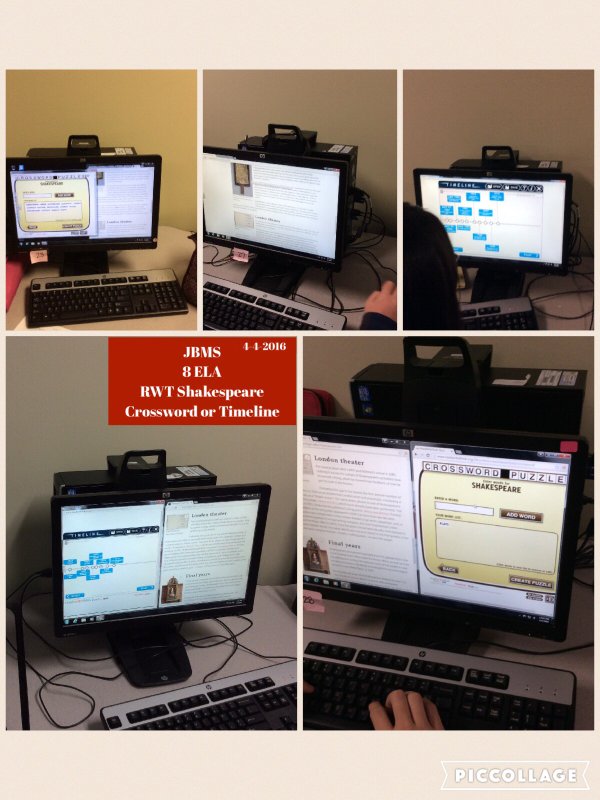
Instead of lecture on Shakespeare, I devoted two days to research of choice. Students researched 15 interesting things about Shakespeare and his time and got to choose the product they made. Students could make a crossword with Crossword Creator or the Timeline. Simplify the amount of info and make a Cube.

Monday, April 4, 2016